

Published: October 21, 2026 • Updated: November 21, 2026
e-Transfer Plus Policy 2026: How KPK Teachers Apply Online
A plain-language walkthrough of the Revised eTransfer Policy 2026 (notified 13 May 2026) — eligibility, the monthly portal calendar, merit marks, the HRMIS portal, and what to keep ready. This guide covers the E-Transfer KPK 2026 online apply process — rules, merit and the step-by-step application.
Short answer
- The Revised e-Transfer Plus Policy 2026 KPK is E&SED Khyber Pakhtunkhwa’s online, merit-based system for staff postings and transfers. Notified on 13 May 2026, it replaces all earlier transfer policies and came into force at once.
- It covers the Teaching Cadre (BPS-12 to 18), plus the Education Management (BPS-16 to 18), IT (BPS-16 to 17) and Ministerial (BPS-11 to 17) cadres.
- You apply on the HRMIS portal — not by hand-carrying a file to the office. Note: routine transfers are currently suspended under the teacher transfer ban until 31 December 2026 — see the transfer ban guide (/teacher-transfer-ban-kpk-2026/). The monthly windows below describe how the policy normally works, and will apply again once the ban ends. Manual transfers are banned while the e-Transfer process is running, except the cases the notification exempts in para 4 (court orders, impending retirements, and complaint/penalty cases) — everything else goes through the e-Transfer portal.
- Applications are judged on tenure, performance, student-teacher ratio, domicile and other grounds. The exact weightages are in the official notification, linked below.
- If the Android app misbehaves, use the web portal instead — that is the reliable route today.
If you work in a government school or education office in Khyber Pakhtunkhwa, the way you ask for a transfer has changed. This guide now covers the Revised eTransfer Policy 2026, notified by the Elementary & Secondary Education Department on 13 May 2026. It replaces the earlier transfer policy — the old rules, old timelines and old tenure conditions no longer apply.
This guide walks through what the revised policy actually says, who is covered, how to get into the portal, the month-by-month portal calendar, and — honestly — where the system still frustrates people. Everything here is drawn from the department’s own pages and the 13 May 2026 notification; where a detail is only in the official PDF, we say so and link it rather than guess.
What is the e-Transfer Plus Policy 2026?
The Elementary & Secondary Education Department (E&SED), Government of Khyber Pakhtunkhwa, introduced the policy as, in its own words, “a transparent, merit-based, and technology-driven system for staff postings and transfers.”
The department’s official policy page explains the mechanism: through the automated eTransfer Portal, eligible teaching, management, ministerial and IT staff can apply online for transfers based on clearly defined criteria — including tenure, performance, student-teacher ratio, domicile, and other grounds.
Three things in that sentence matter more than they first appear:
- “Apply online” — the employee initiates the request directly. You are not dependent on someone else forwarding your file.
- “Clearly defined criteria” — decisions are meant to follow published rules rather than discretion, so two people with similar circumstances should get similar outcomes.
- “Student-teacher ratio” — your request is weighed against the staffing need of both schools, not only your own preference. A transfer out of a school that would be left short-staffed is a harder case than one that balances staffing.
Who is eligible, and from when?
The notification itself is more precise than the website summary. It supersedes every earlier notification on the subject and names four cadres, each with its own pay-scale band:
From the notification — No. SO(SM)/E&SED/7-1/2020/PT/General, dated Peshawar the 13 May 2026: “In supersession of all previous notifications in this regard, the Elementary & Secondary Education (E&SE) Department has been pleased to notify the revised eTransfer Policy 2026.” It may be called the Khyber Pakhtunkhwa Elementary & Secondary Education Department eTransfer Policy 2026 and comes into force at once.
| Cadre (as notified) | Who this typically means |
|---|---|
| Teaching Cadre — BPS-12 to BPS-18 | PST, PSHT, SPST, CT, SST, AT, TT, DM, PET, Qari and equivalent teaching posts in that band |
| Education Management Cadre — BPS-16 to BPS-18 | Management posts in the education administration line |
| Ministerial Cadre — BPS-11 to BPS-17 | Office / clerical establishment — junior clerk, senior clerk, assistant and similar |
| Information Technology (IT) Cadre — BPS-16 to BPS-17 | IT posts within E&SED, including computer operators and IT staff |
Worth noting: BPS-12 is not the floor for everyone. The Ministerial Cadre starts at BPS-11, so a junior clerk below BPS-12 is inside the policy even though a teacher at the same scale would not be. Most summaries online quote “BPS-12 to 18” for all four cadres, which is wrong.
The minimum service test
The notification sets a minimum tenure of 2 years on your present post before you can seek an e-Transfer. Beyond that: regular teachers must have completed their probation period, contract/adhoc teachers need 3 years of service from the date of appointment, and regularized or fresh appointees under the Act must complete the length of service their regularization terms require.
Who is not eligible
The notification is equally specific about exclusions:
- Anyone who has not completed 2 years on the present post — the minimum tenure for eligibility.
- Contract and adhoc teachers with less than three years’ service from the date of appointment (para 9).
- Regularized and fresh appointees under the Act who have not completed the length of service required by their regularization terms.
Two outright bans
- Manual postings and transfers are completely banned while the eTransfer process is running, except the cases exempted in para 4 (para 5).
- Transfers from merged areas to settled areas are completely banned — except postings to home districts on grounds of impending retirement, and mutual or substitute postings (para 6).
What sits outside the policy
Para 4 exempts two categories of teaching-cadre transfer from the eTransfer Policy 2026 altogether: transfers on court orders and impending retirements, and transfers on complaints, penalties, or criminal and legal proceedings.
The policy covers both inter-district and intra-district transfers of provincial and district cadre posts (para 7).
Inter-district transfers: the extra rules
Moving from one district to another follows the same merit — plus four extra conditions from the notification:
- Apply on the prescribed form (Annex-I) with the 9 supporting documents the notification lists.
- You need an NOC and the acceptance of the receiving DEO — without it, the transfer cannot go through.
- On transfer, you go to the bottom of the seniority list in your new district.
- No transfers out of the merged districts — except a posting to your home district on impending retirement, or a mutual/substitute arrangement. Inter-district transfer against senior posts in the 100% district promotion quota (SCT, SDM, SPET, SAT, STT, S-Qari/Qaria, SPST, PSHT) is not allowed at all.
Special grounds — and the documents each one needs
This is the section most people actually need, and it is the part almost no summary reproduces. The notification lists the special provisions and states plainly that each must be supported by valid proof, itemised ground by ground. An application on special grounds without the right attachment is the most avoidable rejection there is.
| Special ground | Proof / documents required |
|---|---|
| 1. Spouse / Wedlock Policy | Nikah Nama or NADRA marriage certificate; spouse’s job proof (appointment letter, service certificate, or posting/transfer order showing the spouse is working at the requested station); CNIC copies of applicant and spouse |
| 2. Divorce | Proof of marriage; divorce certificate or decree — an official court decree confirming the divorce; updated CNIC if marital status has changed |
| 3. Widow | Proof of marriage; husband’s death certificate issued by the local authority; CNIC copies of applicant and late husband |
| 4. Medical | CNIC copy; medical certificate issued by the Standing Medical Board with medical reports and treatment records. If the case rests on family medical grounds: Family Registration Certificate (FRC) from NADRA or Form-B, plus the dependent’s medical reports (parent / spouse / child) |
| 5. Disability | CNIC copy; disability certificate issued by the Standing Medical Board — the notification marks this “most important”; recent medical reports or prescriptions supporting the condition |
| 6. Security / Enmity / Threat | CNIC copy; proof of enmity or threat (marked “most important”) — FIR copy if registered, police report or verification letter confirming the threat, court documents if litigation is ongoing, and any written complaints submitted earlier to the authorities |
| 7. PST (BPS-12) to parent UC / Husband’s UC for a married female | CNIC and domicile; copy of first appointment order. A female teacher married into another UC must also attach proof of marriage and proof of the husband’s UC (husband’s CNIC / domicile) |
| 8. OSDs and correction of wrong postings | OSDs and wrongly posted teachers may be transferred or posted against their original cadre posts at any time, through the portal or manually. They may use the special provision module for choice postings on their original cadre posts |
Two words that matter: For medical and disability grounds the notification specifies the Standing Medical Board — not any doctor, hospital or private clinic. A certificate from anywhere else is the single most common reason a medical-ground application fails.
A strict warning: if any document is found fake or bogus, the applicant is banned from the e-Transfer portal for 2 years — and disciplinary action follows as well. Never upload a paper you cannot prove.

Mutual e-Transfer: the specific rules
Mutual transfer has its own paragraph in the notification, and the conditions are tighter than most people expect:
- A mutual eTransfer can be between two or more teachers of the same scale and cadre — the applicants must be in the same cadre/scale.
- It is allowed only for regular teachers who have completed probation. Contract and adhoc teachers are excluded, except those with the required three years’ service.
- An application will not be considered if any one of the applicants is waiting for actualization of promotion to the next scale, or is facing disciplinary or criminal proceedings. Verification of this rests with the DEOs concerned / Director DCTE / DPD.
That second bar catches people out: if your mutual partner is mid-promotion or under inquiry, both applications fall — not just theirs.
The monthly e-Transfer calendar: when the portal opens
The portal does not stay open all month. The notification fixes a monthly calendar, and each window is meant for one specific kind of work:
These windows are suspended while the transfer ban is in force (until 31 December 2026). Do not plan around a window date until the ban is lifted — confirm with your DEO office or the portal.
- 1st–4th: vacancies are displayed on the portal.
- 5th–8th: applications on Special Grounds and Inter-District transfers.
- 9th–12th: General transfers — give 3 station choices in order of priority.
- 19th–20th: transfer orders are issued.
- 21st–30th: ePostings against promotion and recruitment.
Mark the 9th–12th window on your calendar — that is when most teachers apply. Mutual transfers are the exception: they are allowed all year round between teachers of the same cadre and scale.
Performance-based transfers for senior grades
During the performance-based eTransfer of school heads and teaching staff who teach Grades 9, 10, 11 and 12, the notification states that other transfer options and facilities on the portal will be switched off for that specific month or duration (para 15).
In practice: if you teach the senior grades or head a school, your window may not be the same window as everyone else’s. The notification also makes school heads and teachers of Grades 9–12 whose results or attendance fall below the stated thresholds liable for performance-based transfer once a year, in July–August.
Who oversees the process
For implementation, supervision and redressal of grievances, the notification creates an oversight committee at the E&SE Department plus oversight committees at Directorate level. The departmental committee is chaired by the Special Secretary (Establishment), with the Additional Secretary (Estab), Director E&SE Khyber Pakhtunkhwa, Director EMIS, a representative of the Education Monitoring Authority (EMA), and the Section Officers (Schools) Female and Male, the last serving as Secretary/Member.
Its terms of reference include an awareness campaign in electronic and print media with deadlines for the whole implementation process, overall supervision, and the collection and examination of genuine grievance applications forwarded by the Directorate-level committees. That is the route for a grievance — through the committee, not around it.
Where to read the notification yourself
Everything above is taken from the notification itself. It is a 19-page scanned document, so it will not respond to Ctrl+F — you have to read the pages:
Download: Revised e-Transfer Policy 2026 (official PDF, 13-05-2026)
Every figure below is from Annex-III: The scoring tables are on pages 15 to 19 of the notification, under Annex-III — Scoring Parameters / Indicators for Teaching Cadre (BPS-12 to BPS-18) under the eTransfer Policy 2026. We have transcribed them and checked each form’s parts against its stated total, so the arithmetic below reconciles exactly.
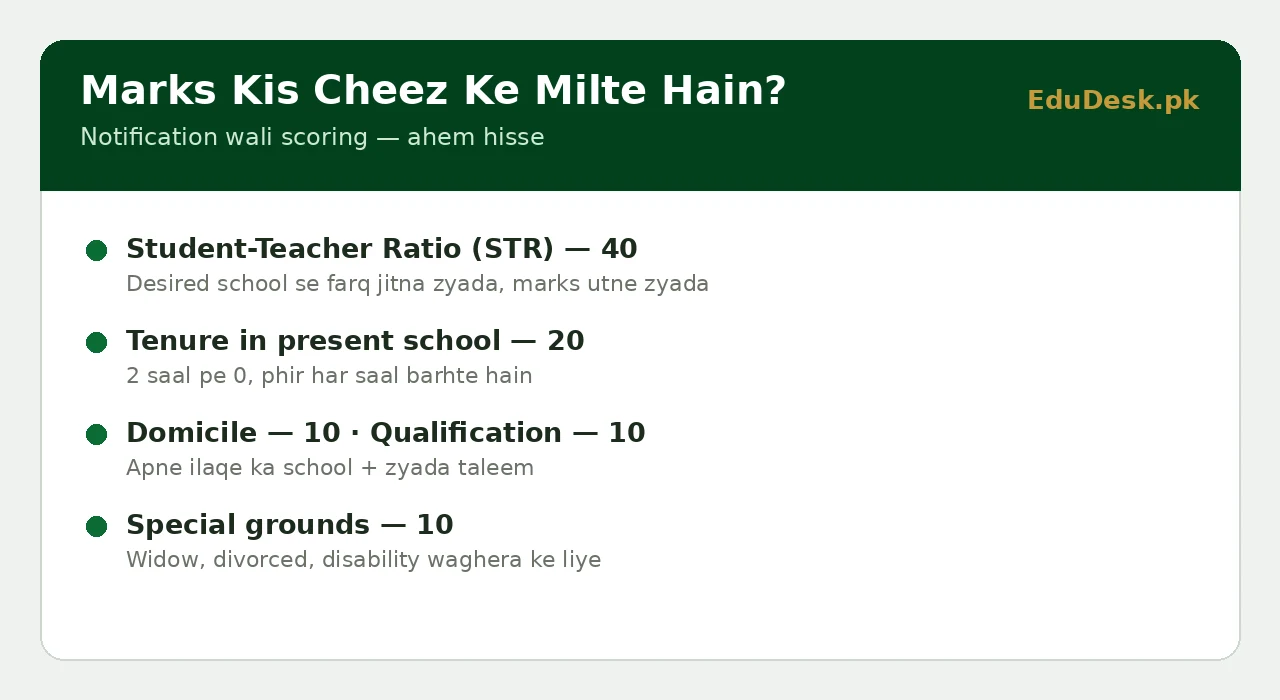
The scoring table: how marks are actually awarded
There is no single score out of 100. The notification uses four different forms, and your total depends on which one you fall under — from 90 marks for a primary teacher to 150 for a high school principal.
| Form | Who it applies to | Total marks |
|---|---|---|
| Form-A | Teachers from BPS-12 to BPS-16, except SSTs | 90 |
| Form-B | Secondary School Teachers (SSTs) | 130 |
| Form-C | Subject Specialists (SS) in BPS-17 & 18 | 130 |
| Form-D | Principals / HMs of High & Higher Secondary Schools, BPS-17 & 18 | 150 |
What each form is made of
| Parameter | Form-A | Form-B | Form-C | Form-D |
|---|---|---|---|---|
| Tenure in present school against present post | 20 | 20 | 20 | 20 |
| Student-Teacher Ratio (STR) | 40 | 40 | — | 40 |
| Number of students in Class 11 & 12 | — | — | 40 | — |
| Disability / Widow / Divorced | 10 | 10 | 10 | 10 |
| Domicile | 10 | 10 | 10 | 10 |
| Higher academic qualification | 10 | 10 | 10 | 10 |
| Latest annual result | — | 40 | 40 | 40 |
| Students’ attendance rate (EMA data) | — | — | — | 20 |
| Total | 90 | 130 | 130 | 150 |
SSTs, note the second route. Form-B awards its 40 result marks two different ways. An SST working in a High or Higher Secondary School is scored on the latest annual SSC result of the subjects they teach. An SST (General) working in a Middle or Primary School is scored instead on the school’s overall students’ attendance rate as per EMA data, on the same 40-mark scale — 90% or above 40, 80–90% 30, 70–80% 20, 60–70% 10, below 60% nil. If you teach in a middle or primary school, you are not shut out for having no SSC result; you are scored on attendance.
Tenure — 20 marks (identical in all four forms)
This is the parameter you cannot influence except by waiting, and it is worth noting how slowly it climbs: two marks per extra year, capped at twelve years.
| Tenure in present school | Marks | Tenure | Marks |
|---|---|---|---|
| Normal tenure of 2 years | 0 | 8 years | 12 |
| 3 years | 2 | 9 years | 14 |
| 4 years | 4 | 10 years | 16 |
| 5 years | 6 | 11 years | 18 |
| 6 years | 8 | 12 years & above | 20 |
| 7 years | 10 | — | — |
Two years of service in your present school earns zero. The clock effectively starts in year three.
Student-Teacher Ratio — 40 marks, the single biggest block
This is the parameter most people misunderstand. You are not scored on your school’s STR. You are scored on the difference between the STR of the school you want and the STR of the school you are in, taken from iEMIS data.
| Difference between STRs of desired school and present school | Score |
|---|---|
| More than 35 | 40 |
| More than 30 and up to 35 | 35 |
| More than 25 and up to 30 | 30 |
| More than 20 and up to 25 | 25 |
| More than 15 and up to 20 | 20 |
| More than 10 and up to 15 | 15 |
| More than 5 and up to 10 | 10 |
| More than 0 and up to 5 | 7 |
| Exactly 0 | 5 |
| Less than 0 | 0 |
The choice that decides your application: A negative difference scores zero out of 40. In plain terms: if you apply to a school that is better staffed than your present one, you forfeit the largest block of marks in the whole scheme. Applying to an overcrowded, understaffed school is what the scoring rewards — the system is built to move teachers towards need, not away from it. Check both schools’ STRs in iEMIS before you pick, because this one choice can be worth more than tenure, domicile and qualification combined.
How STR itself is calculated depends on the form:
- General (Forms A and D): total students in the school ÷ total number of teachers.
- SST in a High / Higher Secondary School: total students in Class 9 & 10 ÷ number of SSTs.
- SST in a Primary / Middle School: total students in the school ÷ total teachers.
- Subject Specialists (Form-C): STR is not used at all — instead the 40 marks go on the difference in the number of Class 11 & 12 students between the desired and present school, on the same banding.
Result and attendance — 40 and 20 marks
Performance enters through examination results, and for heads also through attendance. All of these use the same percentage bands:
| Percentage | Result (40 marks) | Attendance, Form-D (20 marks) |
|---|---|---|
| 90% or above | 40 | 20 |
| 80% to 90% | 30 | 15 |
| 70% to 80% | 20 | 10 |
| 60% to 70% | 10 | 5 |
| Below 60% | 0 | 0 |
- Form-B (SSTs): latest annual SSC result of the subjects you teach if you work in a High / Higher Secondary School — or, for SSTs (General) in Middle / Primary schools, the overall student attendance rate as per EMA data.
- Form-C (Subject Specialists): latest annual HSSC result of the subjects you teach.
- Form-D (Principals / HMs): latest annual SSC / HSSC result of the whole school (40) plus the school’s overall student attendance rate from EMA data (20).
Domicile, qualification and special circumstances
| Parameter | How it is scored |
|---|---|
| Domicile — 10 marks | Full 10 marks when the desired school is in your district of domicile. It is all-or-nothing — there are no partial marks. |
| Higher academic qualification — 10 marks | 10 marks for 21 years of education (PhD); 5 marks for 18 years (M.Phil / MS). Nothing below that. |
| Disability / Widow / Divorced — 10 marks | Awarded only in those special cases. Proof required: for disability, the applicant’s CNIC plus a Standing Medical Board disability certificate; for widowed or divorced female teachers, the equivalent official or authentic certificate. |
Worked example — a PST on Form-A: Eight years in the present school (12), applying to a school whose STR is 22 points higher (25), desired school in the district of domicile (10), M.Phil (5), no special circumstance (0) = 52 out of 90. Had the same teacher applied to a better-staffed school instead, the STR block would have paid 0 and the total would be 27 — the same person, roughly half the score, purely because of which school was chosen.
Before you plan around a forwarded chart: Everything above is transcribed from Annex-III on pages 15–19 of the 13-05-2026 notification, and each form’s parts add up to its stated total. If a chart circulating in a WhatsApp group shows different weightages, a single score out of 100, or the same total for every cadre, it does not match the notification. Open the PDF and check the annex yourself.
How to Apply Online for E-Transfer KPK 2026
Applications go through the department’s Human Resource Management Information System (HRMIS), which sits inside the wider iEMIS platform.
- Open the HRMIS login page. Go to iemis.kpese.gov.pk — HRMIS login. The department also routes staff there from kpese.gov.pk/hris via the “Apply Now” button on the policy page.
- Read the user guide first. The login page itself carries two guides: eTransfer Mobile App — User Guide for Teachers and eTransfer Web Portal — User Guide for Teachers. These are the department’s own instructions and take five minutes to skim.
- Sign in with your username and password. If you have never logged in, or cannot remember the password, use the Forget Password link on that page — it exists on the web portal even though the mobile app does not offer it.
- Check that your record is correct before applying — name, personnel number, designation, BPS, current school, date of appointment. A transfer application built on a wrong service record creates a problem later.
- Fill the transfer application and choose your preferred station(s) as the portal allows, then submit within the open window.
- Keep the submission reference. Note or screenshot the acknowledgement so you can follow up with a specific reference rather than a description.
If your CNIC is “not found in the system”
The HRMIS login page carries an Urdu note that answers the single most common complaint about this system. In plain English it says: if the employee’s CNIC is not found in the system, contact the DEO office.
That is not a bug you can solve from your phone. It means your record is missing or mismatched in the HR database, and only the district office can have it corrected or added. Go with your CNIC, your service book and your last pay slip, and ask specifically for your HR record to be verified in iEMIS.
The KPESE e-Transfer app: what to expect
There is an official Android app, KPESE e-Transfer, published by the developer EMIS – KP E&SE. It is worth knowing its current state before you rely on it.
| On the Play Store listing | Detail |
|---|---|
| Rating | 3.4 stars from 173 reviews |
| Downloads | 50,000+ |
| Last updated | 23 August 2024 |
| Policy referenced in the description | e-Transfer Policy 2024 |
That last row is the one to notice. The listing text still describes the app as working “as per notified e-Transfer Policy 2024”, and the app has not been updated since August 2024 — while the policy in force is the 2026 revision. Reviewers report three recurring problems:
- The application tab not responding, with the issue persisting over weeks.
- No password-reset option inside the app.
- A CNIC “verify” step whose error message does not explain what went wrong.
What to do instead
| Problem | Practical fix |
|---|---|
| Application tab won’t load in the app | Use the web portal in a browser instead. It is the same system and is actively maintained. |
| Forgotten password, no reset in the app | Use Forget Password on the web login page. |
| CNIC not accepted / unclear message | Your HR record needs fixing. Contact your DEO office, as the portal’s own note instructs. |
| Not sure the app matches the 2026 policy | Read the 2026 notification and follow the web portal’s guide, not the app description. |
None of this means the app is useless — 50,000 downloads suggest plenty of people get through it. But if you are near a deadline, do not spend your last evening fighting the app. Open the browser.
Documents and details to keep ready before you apply
The portal will ask you to confirm details that must match your service record exactly. Gather these first — it turns a frustrating hour into ten minutes:
- CNIC (and the number as it appears in official records)
- Personnel number — the same one printed on your pay slip
- Designation and BPS, exactly as notified
- Date of first appointment and date of joining your present school — tenure is one of the named criteria, so these dates matter
- Present school name and EMIS code
- Domicile district — also a named criterion
- Latest pay slip, to cross-check personnel number and designation
- Preferred stations, decided in advance rather than in the form
- Supporting papers for any special ground you intend to claim, ready to produce if asked
Two of those are worth pulling before you start. You can download your current pay slip from the EduDesk Salary Slip Downloader, and if you want to check what your pay and allowances should look like after a move, the KPK Salary Calculator will work it out from your BPS and stage.
The other KPESE systems worth knowing
e-Transfer Plus is one piece of a larger digitisation push by E&SED. Three related systems come up constantly in school offices:
iEMIS — Integrated Education Management Information System
The umbrella platform that HRMIS sits inside. It holds employee and school records, and it is the reason your CNIC either resolves at login or does not.
E-Notification — QR-verified orders
E&SED has launched a QR-based E-Notification System for staff posting and transfer orders. Each notification carries a unique QR code, which means an order can be checked for authenticity rather than taken on trust. If you receive a transfer order, scan the code.
School Self-Reporting (SSR)
An online portal for collecting data directly from schools, rather than through layers of consolidation. Relevant to heads and school leaders more than to individual applicants.
Talent Pool
Separate from transfers, the department runs a Talent Pool portal for those applying to teach at a school of their choice. If you are not a serving employee seeking a transfer, this is the other door.
After the order: the paperwork still has to be done
An e-Transfer order does not complete the move. Once the notification is issued, the older office routine still applies, and getting it wrong delays your salary at the new station:
- A relieving chit from the school you are leaving
- A charge report — made over and received charge, in the prescribed form
- An arrival report submitted at the new station
- Your LPC (Last Pay Certificate) and service book moving with you
- Pay activation at the new DDO, so the next month’s salary is drawn correctly
These are exactly the documents the EduDesk Letter Bank generates in the official format — the charge report, arrival report and relieving chit are ready-made templates you fill and print. If you are a DDO or school head handling the office side, the Expenditure Generator produces the monthly reconciliation statement in the E&SE format.
Common mistakes to avoid
- Leaving login until the last day. A CNIC mismatch takes a DEO office visit to fix — that is days, not minutes.
- Applying on a wrong service record. Correct the record first; a transfer built on bad data unravels later.
- Assuming the app and the policy are in sync. The app listing still cites the 2024 policy. The notification governs.
- Not keeping the acknowledgement. Without a reference, follow-up becomes a conversation instead of a query.
- Forgetting the ratio works both ways. Student-teacher ratio is a named criterion, so the staffing effect on both schools counts.
Frequently asked questions
Who can apply under the Revised eTransfer Policy 2026?
The policy covers the Teaching Cadre (BPS-12 to 18), the Education Management Cadre (BPS-16 to 18), the Ministerial Cadre (BPS-11 to 17) and the IT Cadre (BPS-16 to 17). You must have completed at least 2 years on your present post; regular teachers must have finished probation, and contract/adhoc teachers need 3 years of service. Manual transfers are banned while the e-Transfer process is running, except the cases the notification exempts in para 4 (court orders, impending retirements, and complaint/penalty cases) — everything else goes through the e-Transfer portal.
What criteria are transfer applications judged on?
Applications are scored on four merit forms: Form-A (BPS-12 to 16 except SSTs, 90 marks), Form-B (SSTs, 130 marks), Form-C (Subject Specialists, 130 marks) and Form-D (Principals/Head Masters, 150 marks). Shared components are tenure (up to 20), STR or student-number difference (up to 40), board results (up to 40), disability/widow/divorced (10), domicile (10), and PhD (10) or M.Phil (5).
Where do I log in to apply for an e-Transfer?
Applications are submitted through the Human Resource Management Information System (HRMIS) at iemis.kpese.gov.pk. The login page also links the department’s own user guides for both the web portal and the mobile app, and has a Forget Password option.
The app says my CNIC is not found. What should I do?
The HRMIS login page instructs that if an employee’s CNIC is not found in the system, you should contact the DEO office. This means your HR record is missing or mismatched in the database, and only the district office can correct it. Take your CNIC, service book and latest pay slip with you.
There is no password reset in the KPESE e-Transfer app. How do I reset it?
Use the web portal instead. The HRMIS login page carries a Forget Password link, even though the Android app does not currently offer a reset option inside the app.
Is the KPESE e-Transfer app up to date with the 2026 policy?
The Play Store listing for KPESE e-Transfer, by developer EMIS – KP E&SE, was last updated on 23 August 2024 and its description still refers to the e-Transfer Policy 2024. The app holds a 3.4-star rating from 173 reviews with 50,000+ downloads. For anything policy-critical, follow the 2026 notification and use the web portal.
How can I verify that a transfer order is genuine?
E&SED has introduced a QR-based E-Notification System for postings and transfer orders. Each notification carries a unique QR code that can be scanned to check authenticity.
What paperwork do I need after the transfer order is issued?
You will normally need a relieving chit from the outgoing school, a charge report, an arrival report at the new station, and your LPC and service book, followed by pay activation at the new DDO so your next salary is drawn correctly.
When does the e-Transfer portal open each month?
The portal follows a fixed monthly calendar: vacancies are shown from the 1st to the 4th; Special Grounds and Inter-District applications from the 5th to the 8th; General transfers (with 3 prioritized station choices) from the 9th to the 12th; transfer orders are issued on the 19th–20th; and ePostings for promotion and recruitment run from the 21st to the 30th. Mutual transfers are allowed all year round.
What happens if I upload fake documents?
The notification is strict: documents found fake or bogus mean a 2-year ban from the e-Transfer portal, plus disciplinary action.
Sources: kpese.gov.pk · iemis.kpese.gov.pk · Google Play listing for KPESE e-Transfer
Disclaimer: EduDesk.pk is an independent resource — not a government website, and not affiliated with the Elementary & Secondary Education Department. Transfer policies and marks are revised by notification from time to time; where anything here differs from the latest notification, the official notification prevails.


6 Comments
Comments are closed.