

Published: October 21, 2026 • Updated: November 21, 2026
PIFRA Registration Online Salary Slip (2026) — Get Your Salary Slip Straight to Your Email
Every month, thousands of government employees still walk into the accounts office to collect a piece of paper — their PIFRA salary slip.
You don’t have to. PIFRA salary slip registration is one short form on the official portal, and your salary slip arrives in your email inbox every month — automatically, free, forever.
The registration takes about five minutes. But people get stuck on the same handful of things: which code to enter, what a “personnel number” actually is, and why the slip never showed up afterwards.
This guide fixes all of that.
Already registered? If your email is already registered with PIFRA, you don’t need the form below — here’s how to check and download your PIFRA salary slip each month. You can also look up your slip on the EduDesk Salary Slip Portal with your name, personnel number and CNIC.
Pensioners Can Register Too
Retired government employees can use the same PIFRA registration to receive their monthly pension slip by email. The process and the form are exactly the same as for serving employees — only your existing record is needed.
⚠️ Read This First: Only Register on the Official Site
Search “PIFRA registration” and you’ll find a dozen websites that look official. Many are not. Some copy the government portal’s design and ask for your CNIC. At least one has been injected with gambling spam.
Registration happens in one place only — the official government portal at pifra.gov.pk.
No website, including this one, needs your CNIC to “register you for PIFRA.” Nobody can register on your behalf. If a site asks for your CNIC to fetch your salary slip, close it.
We’ll show you exactly where to go, and you’ll do it yourself on the government’s own page. That’s the whole point.
There Is No PIFRA App — and No PIFRA Login
PIFRA has no official mobile app, and there is no PIFRA login or dashboard where you enter a username and password to download slips. Any app or website that asks you to ‘log in to PIFRA’ or create a PIFRA password is fake. Registration happens only on the official portal, and your slip only ever arrives by email.
Table of Contents
- What PIFRA actually is
- Who can register
- What you need before you start (and what a personnel number really is)
- Government codes — get this right
- Step-by-step registration
- When will the slip arrive?
- Why your slip is password-protected
- Common problems and real fixes
- How to change your email address
- Who to contact if something goes wrong (KP employees)
- FAQs
What PIFRA Actually Is
PIFRA stands for Project to Improve Financial Reporting and Auditing — a reform project that moved the entire government payroll onto one computerised system.
That system is now known as FABS (Financial Accounting and Budgeting System), run under the Controller General of Accounts (CGA). People still say “PIFRA” out of habit, and the web address still carries the name — the services you need live at m.pifra.gov.pk.
For you, it means one simple thing: your salary data already sits in a central system. Registration just tells that system where to email your copy.
Who Can Register?
You can register if:
- You are a government employee — federal, provincial, or district
- Your salary is processed through the Accountant General office or a District Accounts Office
- You have a CNIC
- You have a personnel number
- You have an active email address
Teachers, clerks, doctors, nurses, police staff, lecturers — all covered.
Private employees cannot register. Neither can anyone whose salary isn’t drawn through the AG/DAO system.
And it is completely free. If anyone asks you for money to register, they’re scamming you.
What You Need Before You Start
Keep these five things in front of you:
1. Your Government Code — a single letter for your province (see below).
2. Your Personnel Number — and this is where most people get stuck.
Your personnel number is the unique number the AG Office assigned to you as an employee. It is not your CNIC. It is not your school or department ID. It’s usually an 8-digit number, and the easiest place to find it is on any old manual salary slip, or by asking your DDO.
Get this wrong and nothing works. It’s the single most common reason registration fails.
3. Your CNIC — the full 13 digits, without dashes (e.g. 1730112345671).
4. Your date of birth — exactly as it appears in government records, not as you remember it. If your service record says a different date than your CNIC, use the one in the record.
5. Your cell number — the mobile number the form asks for right after your date of birth, before the verification step.
Government Codes — Get This Right
| Code | Government |
|---|---|
| F | Federal |
| P | Punjab |
| S | Sindh |
| N | Khyber Pakhtunkhwa |
| B | Balochistan |
| DGP | District Govt Punjab |
| DGN | District Govt KP |
| K | Kashmir |
| GB | Gilgit-Baltistan |
| GBC | GB Council |
| C | Kashmir Council |
KP employees: your code is DGN (District Government KP). Provincial government employees use N.
This same code appears again later if you ever check DDO budget reports, so it’s worth remembering.
PIFRA Salary Slip Registration — Step by Step

Step 1 — Open the official portal. The registration page is:
m.pifra.gov.pk/salaryslip_empEmployee Salary Slip E-mail Registration
Some guides tell you to start from the main pifra.gov.pk site and find the Services menu. Skip that — the main site is often down, and you do not need it. The direct address above is the same registration form, and it works.
Either way, check the address ends in .gov.pk before you type anything into it.
If the page shows “browser not supported”: this is a common error, and it doesn’t mean the portal is down. The system runs on SAP, and it’s fussy about browsers. Open it in an up-to-date Chrome on a laptop or phone and it will usually load fine. Don’t give up on the first try — plenty of people assume the site is broken when it’s just the browser.
Step 2 — Enter your Government Code. KP school and district staff enter DGN; provincial government employees enter N.
Step 3 — Enter your Personnel Number. The AG Office number from your old salary slip — not your CNIC.
Step 4 — Enter your CNIC. All 13 digits, no dashes.
Step 5 — Enter your date of birth. Exactly as recorded in government records.
Step 6 — Enter your cell number. The form asks for your mobile number right after your date of birth, before the verification step.
Step 7 — Verify your information. Click the verification button. The system checks your details against the payroll database.
- ✅ If everything matches, it confirms and moves you forward.
- ❌ If it doesn’t, your data doesn’t match the government record. That’s not a website bug — it means what you typed and what the AG Office has on file are different. Recheck your personnel number first; it’s usually that.
Step 8 — Enter your email address. You’ll need to type it twice. Use an email you’ll keep for years — changing it later is a hassle (see below).
Gmail works well and is what most employees use.
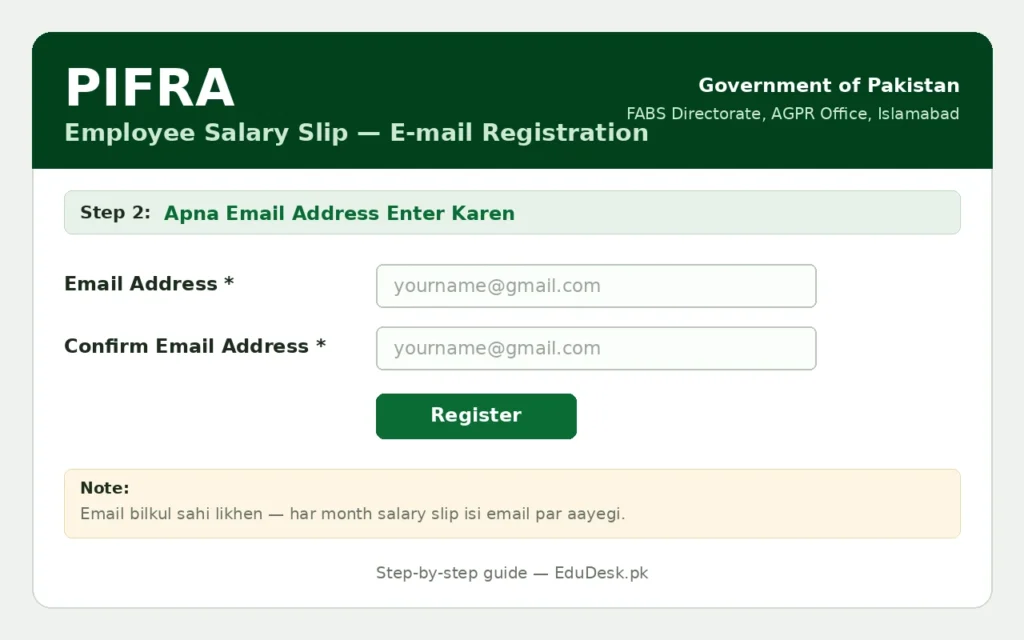
Step 9 — Submit.
That’s it. You’re done.
When Will the Slip Actually Arrive?
Here’s something most guides get wrong.
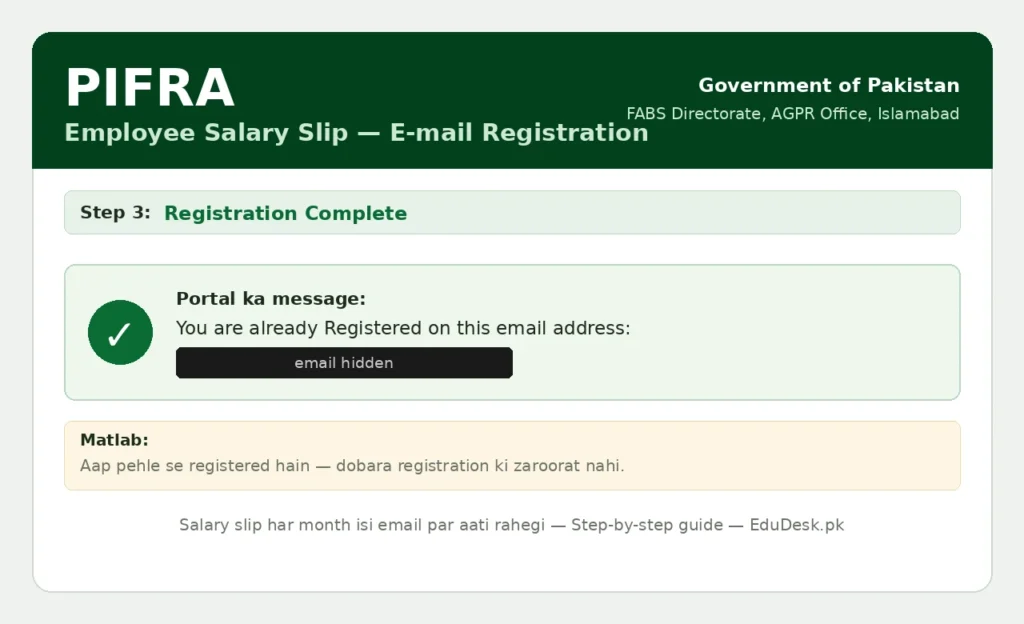
PIFRA often does not send a “click to verify” confirmation email. People sit around waiting for a verification link that never comes, assume registration failed, and register again.
What usually happens instead: your slip simply starts arriving with the next payroll cycle. Slips typically land in the first week of the month.
So after submitting — don’t panic, don’t re-register. Wait for the next payroll run.
Already Registered? Download Your PIFRA Salary Slip as PDF
A registered employee can also download the PIFRA salary slip as a PDF from the portal with their personnel number and CNIC. If you want the full step-by-step for downloading (including the email route and the AG KPK enquiry route), see our KPK salary slip download guide.
Why Is My Salary Slip Password-Protected?
Some PIFRA emails arrive as an encrypted PDF and ask for a password. This confuses a lot of people who think the file is corrupted.
The password is usually your CNIC without dashes — and in some cases just the last 4 digits of your CNIC.
Try the full CNIC first. If that doesn’t open it, try the last four digits.
Common Problems and Real Fixes
Most PIFRA salary slip registration problems come from a mismatch between the form and your service record — the fixes below cover almost all of them.
❌ “My slip never arrived.” Check Spam and Promotions in Gmail first — this is the number one cause, and it’s almost always where the slip is hiding.
Permanent fix: In Gmail, go to Settings → Filters → Create a new filter → enter pifra.gov.pk → tick “Never send it to Spam.” Takes thirty seconds and you’ll never lose a slip again.
Your slip is emailed from [email protected]. Search your mailbox for ‘[email protected]‘ or ‘PIFRA’ before assuming it never came. Check the Spam and Promotions folders too — and add [email protected] to your contacts so future slips land in your inbox. Also make sure you are checking the same email account you registered with; many employees check a second Gmail by mistake.
❌ “The page won’t open / browser not supported.” The portal runs on SAP and rejects older or unusual browsers with a “browser is not supported” message. It doesn’t mean the site is down. Open it in an updated Chrome, and try again outside peak hours (early morning is smoother, month-end is busiest).
❌ “Verification failed — my details don’t match.” Your information in the payroll database doesn’t match what you entered. Check, in this order:
- Personnel number (the usual culprit — people enter their department ID or CNIC instead)
- Date of birth — the record’s version, not the one you remember
- CNIC — 13 digits, no dashes
If all three are definitely correct and it still fails, your record itself may be wrong. Only your DDO can get that fixed.
Sometimes the mistake is not yours — the CNIC or date of birth stored in the government’s own record may be wrong. Call the FABS helpdesk (051-9107248) and ask which CNIC and date of birth the system holds for you. Register using exactly those values, then have your DDO and accounts office correct the record afterwards. Do not leave a wrong CNIC or birth date in your record — it can create serious problems in your pension case at retirement.
❌ “I typed my email wrong.” See the next section — this is fixable, but not online.
❌ “I’m a new employee and nothing works.” Your record may not be in the system yet. New appointments take a payroll cycle or two to appear. Ask your DDO to confirm you’re in the payroll.
❌ I registered twice with different emails. Registering again with a second email address can confuse the system and delay your slip. If your email has changed, do not register again — use the email-change method explained in this guide instead.
How to Change Your Email Address
You cannot change it on the website. There’s no “edit profile” button.
To change it, you have to get the old email removed first, then register again with the new one. That means writing to the accounts office — an email to [email protected] asking for the old address to be deleted from your record, so you can re-register.
This is exactly why you should register with an email you’ll keep. Not a work email you might lose access to. Not one you barely check.
KP Employees: The AG KPK Enquiry Route
If your email slip still does not arrive, Khyber Pakhtunkhwa employees have a second route. The Accountant General KP office runs an online Information Enquiry service: choose ‘Pay Slip’ and submit your Personal Number, name, father’s name, CNIC, date of birth and email address. The same enquiry system can also provide your pension slip, GP Fund balance sheet and income tax statement.
Who to Contact if Something Goes Wrong (KP Employees)
Most guides give you a generic countrywide helpline. If you’re in Khyber Pakhtunkhwa, there’s a better route — your own Accountant General office.
PIFRA is the system. But the office that actually maintains your payroll record is the Accountant General Khyber Pakhtunkhwa, along with its 36 District Accounts Offices (DAOs) across the province. Your salary is paid from the Provincial Consolidated Fund through them, and AG KP reports up to the Controller General of Accounts in Islamabad.
So when your data is wrong — not the website, but the actual record — this is where it gets fixed.
Official contacts:
| For | Contact |
|---|---|
| Your salary/payroll record | Your District Accounts Office (DAO) — go through your DDO first |
| GP Fund queries (KP employees only) | Ph: 091-9211332 · [email protected] |
| Information requests (Public Information Officer, Additional AG KP) | Ph: +92 91 9211279 · [email protected] |
| Office address | Accountant General Khyber Pakhtunkhwa, 10th Fort Road, Peshawar (Post Box 1340, GPO Peshawar Cantt) |
FABS / PIFRA helpdesk: 051-9107248 · Email: [email protected] · To remove an old email registration: [email protected]
The right order to escalate:
- Your DDO first. Almost every registration failure is a data mismatch, and your DDO is the one who can correct your record. Start here — don’t skip to Peshawar.
- Your District Accounts Office, if the DDO says the record has already been sent up.
- AG KP, for GP Fund or formal information requests.
Going straight to the AG office for a problem your DDO could fix in ten minutes just wastes your day.
A Few Tips Worth Following
- Register once, with a permanent email. Changing it later is genuinely annoying.
- Save your personnel number somewhere. You’ll need it again.
- Never share your slip publicly. It contains your full salary breakdown and personal details.
- Never pay anyone to register you. It’s free.
- Ignore any site that asks for your CNIC to “check your slip.” The official system emails you; it doesn’t have a public lookup.
Frequently Asked Questions
Is PIFRA registration free? Yes. It’s a free government service. Anyone charging you for it is a scam.
What is my personnel number? It’s the unique employee number assigned by the AG Office — usually 8 digits. It is not your CNIC and not your department ID. Find it on an old manual salary slip, or ask your DDO.
What is the government code for KPK? For district government employees — including school staff — it is DGN. Provincial government employees use N. (Federal is F, Punjab P, Sindh S, Balochistan B.)
I registered but got no confirmation email. Did it fail? Probably not. PIFRA often doesn’t send a verification link at all — the slip just starts arriving from the next payroll cycle. Wait one cycle before doing anything.
Why does my salary slip ask for a password? Some slips are encrypted. The password is usually your CNIC without dashes, or sometimes just the last four digits.
My salary slip stopped coming. Why? Check Spam and Promotions first. If it’s genuinely not arriving, your email or payroll record may have changed — talk to your DDO.
Can I check my salary slip without registering? No. There’s no public “search by CNIC” tool for salary data — and there shouldn’t be, because that would expose everyone’s private pay details. Any website offering that is not the government.
The site says my browser is not supported. Is the portal down? No. The system runs on SAP and blocks older or unusual browsers. Open the page in an updated Chrome and it should load normally.
Who do I contact if my data is wrong? Your DDO first — they maintain and correct your record. If it has already gone up, your District Accounts Office. For GP Fund matters, AG Khyber Pakhtunkhwa on 091-9211332.
Can private employees register? No. Only government employees whose salaries are processed through the AG or District Accounts Offices.
How do I change my registered email? Not through the site. Write to [email protected] to have the old address removed, then register again with the new one.
Conclusion
PIFRA registration is one of those rare government processes that’s genuinely simple — once you know the three things that trip everyone up:
- Your government code (KP school and district staff = DGN, provincial employees = N)
- Your personnel number — not your CNIC, not your department ID
- There’s often no verification email — the slip just starts arriving
Get those right, register on the official pifra.gov.pk portal, and you’ll never queue at the accounts office again.
Register once. Get your salary record for life.


11 Comments
Comments are closed.